Logitech
Logitech Combo Touch iPad Pro 11-inch (1st, 2nd, 3rd, 4th gen - 2018, 2020, 2021, 2022) Keyboard Case - Detachable Backlit Keyboard, Click-Anywhere Trackpad - Oxford Gray; USA Layout
Couldn't load pickup availability
About This
- Compatibility: For iPad Pro 11-inch (1st, 2nd, 3rd, 4th gen) - A1980, A2013, A1934, A1979, A2228, A2068, A2230, A2231, A2377, A2459, A2301, A2460.Viewing Angles: 10°-60°
- Do it all with Combo Touch: Four versatile use modes allow you to type, sketch, view and read without ever having to remove your iPad Pro from the keyboard case
- Detachable keyboard and adjustable kickstand: Remove the keyboard when you're done typing for more flexibility and enjoy 50 degrees of adjustable viewing angles
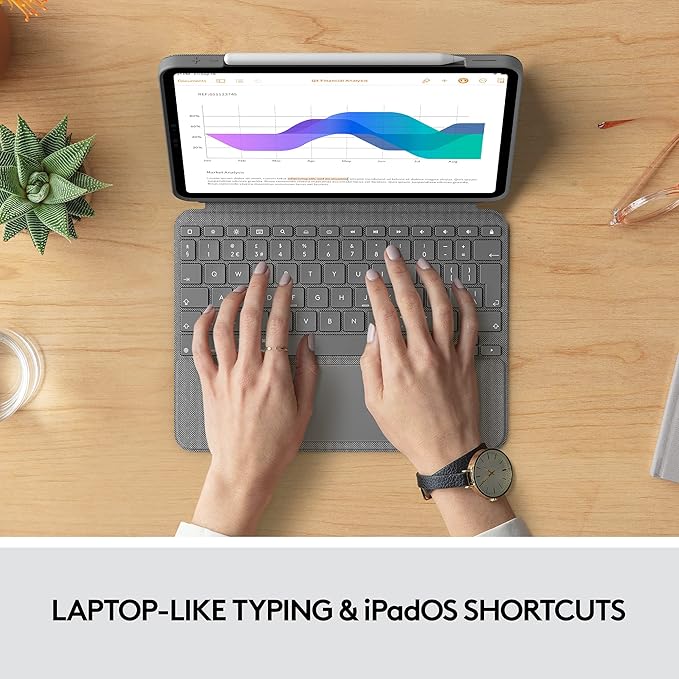
- Large, click-anywhere trackpad: This iPad keyboard case features a responsive and reliable trackpad that allows you to use the entire surface to work and perform Multi-Touch trackpad gestures
- Backlit, laptop-like keyboard: Backlit keys auto-adjust to your environment with 16 levels of brightness and a full row of iPadOS shortcut keys provide one-tap access to volume controls and more
- Front, back and corner protection: A durable form-fit cover protects the front, back, and corners of your iPad Pro, securely holding it in place no matter what you’re doing
- SMART CONNECTOR technology: Enjoy instant power and pairing with Combo Touch keyboard case and never worry about charging as power is sourced directly from your iPad Pro
- Home for Apple Pencil: Easily charge your Apple Pencil while keeping the case on thanks to a convenient opening in the side of the iPad Pro case
- Apple iPad and Apple Pencil are NOT included and is sold separately.
Overview
- Brand : Logitech
- Compatible Devices : iPad Pro
- Connectivity Technology : Powered by iPad via the Smart Connector
- Keyboard Description : Membrane
- Recommended Uses For Product : Office
- Special Feature : Backlit, Integrated Stand, Rechargeable, Trackpad
- Color : Oxford Gray
- Keyboard backlighting color support : Single Color
- Style : 1st, 2nd, 3rd & 4th gen
- Product Dimensions : 9.92"L x 0.62"W x 7.45"H
Share

Customer Reviews
-
⭐️⭐️⭐️⭐️⭐️
"Their customer service is fantastic. I had a question about a product and received a helpful response within hours. Shopping here feels personal and easy."
— Olivia S. -
⭐️⭐️⭐️⭐️⭐️
"The quality of the products is outstanding. From the lighting to the rugs, everything feels premium and thoughtfully made. Highly recommend!"
— David L. -
⭐️⭐️⭐️⭐️⭐️
"I was amazed at how quickly my order arrived. The packaging was neat, and every item was exactly as described. Shopping here is a breeze."
— Emily K.
Blog Posts
View all-
The “One-Touch” Desk Rule: A Simple Way to Stop...
Introduction Most clutter doesn't arrive all at once. It begins with one small decision: “I'll put this here for now.” A receipt lands beside the keyboard. A document gets placed...
The “One-Touch” Desk Rule: A Simple Way to Stop...
Introduction Most clutter doesn't arrive all at once. It begins with one small decision: “I'll put this here for now.” A receipt lands beside the keyboard. A document gets placed...
-
How to Make Group Study Sessions More Productiv...
Introduction Group study sounds productive. Then everyone arrives. Someone starts talking about the weekend. Someone forgot the textbook. Another person asks: “So… what are we actually studying?” Forty minutes later,...
How to Make Group Study Sessions More Productiv...
Introduction Group study sounds productive. Then everyone arrives. Someone starts talking about the weekend. Someone forgot the textbook. Another person asks: “So… what are we actually studying?” Forty minutes later,...
-
Build a Personal Learning Library: Save What Yo...
Introduction Think about everything you've read during the last year. Books. Articles. Courses. Reports. Tutorials. How much of it can you remember? We consume enormous amounts of information, but useful...
Build a Personal Learning Library: Save What Yo...
Introduction Think about everything you've read during the last year. Books. Articles. Courses. Reports. Tutorials. How much of it can you remember? We consume enormous amounts of information, but useful...